



Split any video into equal clips in seconds.
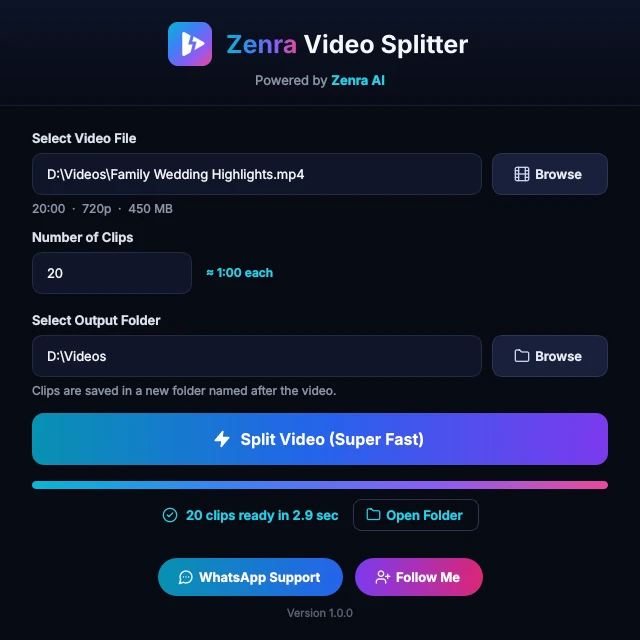
Pick a video, type how many clips you want, choose a folder — done. Equal clips in original quality, ready for WhatsApp Status, Shorts and Reels.
- Version 1.0.0
- Windows 10 and 11 (64-bit)
- Mac version coming soonmacOS
- Free, no watermark
Simple outside, smart inside
Made for people who post a lot and don't want to edit every clip by hand.
Very fast
No slow re-encoding — a 20-minute video splits into 20 clips in a few seconds.
Original quality
Clips are copied straight from your video, so they look exactly like the original.
Exactly your number
Ask for 10 clips, get 10 equal clips — every time, with any video.
Smart cut points
Cuts move to natural pauses, so no word gets cut in half.
Status-ready lengths
Close to a 60-second, 90-second or 3-minute limit? No clip goes over it — perfect for WhatsApp Status, Shorts and Reels.
Offline and private
Everything happens on your PC. Nothing is uploaded, and there's no watermark.
How to use it
Four steps. That's it.
Select a video
Click Browse or drag your video onto the app.
Number of clips
Type how many parts you want — the app shows how long each clip will be.
Choose a folder
Your video's folder is filled in for you. Change it if you like.
Split
Press Split Video, then Open Folder to see your clips.
Frequently asked questions
Need help? Ask us on WhatsApp.
Is Zenra Video Splitter free?
Yes. Zenra Video Splitter is free — no watermark, no sign-up and no upload.
Does it lose video quality?
No. In most cases the clips are copied without re-encoding, so they keep 100% of the original quality. Only when the video's structure needs it are a few frames at a cut re-encoded, at very high quality.
Will my clips fit WhatsApp Status, Shorts and Reels?
Yes. When your clips are close to a 60- or 90-second limit (or 3 minutes for Shorts and Reels), the app makes sure no clip goes over it.
Which video formats work?
MP4, MKV, MOV, AVI, WEBM and most other video files.
Does it work on my computer?
Zenra Video Splitter works on Windows 10 and Windows 11 (64-bit). A Mac version is coming soon.It also runs on Mac — use Download for Mac above.
How do I split a video for WhatsApp Status?
Open the app, pick your video, type how many parts you want and press Split Video. When the parts are close to WhatsApp's 60- or 90-second limit, the app makes sure none goes over it. Then post the parts to your Status in order. See the step-by-step guide.
How do I get new versions?
The app updates itself. When a new version is ready you see a popup — one click and it installs and reopens.
Windows shows a blue warning screen. Is it safe?
Yes. New apps without a code-signing certificate can show a SmartScreen warning. Click More info, then Run anyway.
Want clips that pick themselves?
Zenra AI Viral Clips finds the best moments in a long video and adds captions, titles and speaker framing automatically.
The splitter is free, with no card and no sign-up. It updates itself automatically.