
Windows, Mac & mobile app development
Desktop and mobile apps your customers will actually use — for Windows, Mac, iPhone and Android. We handle the whole job: design, development, installers, licensing, payments, automatic updates and the app store launch.
- Fixed quote before we start
- Delivered in days
- You own everything
Is this for you?
Windows, Mac & mobile app development is a good fit when one of these sounds familiar.
- Your customers need an app, not just a website
- You want a Windows or Mac tool for your team or your customers
- You need licensing, payments and updates that simply work
- Your current app is slow, unstable or hard to update
What we build
From a focused desktop tool to an app on every platform — designed, built, launched and kept up to date.
Windows desktop apps
Fast Windows apps with a proper installer, Start menu and taskbar shortcuts, and one-click automatic updates.
Mac apps
macOS apps for Apple silicon and Intel Macs — packaged, signed and notarized so they open without warnings.
iPhone & Android apps
Mobile apps built once for both platforms with Flutter or React Native, or fully native when you need it.
Installers & auto-updates
Installers, update servers and update notices, so every user stays on the latest version.
Licensing & payments
Free trials, license keys, subscriptions and in-app purchases — the same kind of system our own apps run on.
AI inside your app
Speech, vision and language features that run in the cloud or on the device, like our own Viral Clips app.
Backends & APIs
Accounts, databases, push notifications and admin dashboards on Supabase, Firebase or your own server.
App Store & Google Play launch
Store listings, screenshots, privacy forms and submission, handled end to end under your own account.
Updates & maintenance
Bug fixes, new OS versions, new features and crash monitoring after launch.
What every app comes with
The parts that decide whether people keep using an app — built in from the start, not sold as extras.
- A proper installer, or App Store and Google Play builds
- Automatic updates, so every user stays on the latest version
- Crash and error reporting, so problems are fixed fast
- Fast start-up and low memory use
- A clear, readable design that works on every screen size
- Licensing, payments or sign-in when your app needs them
- Code signing in your name where the platform requires it
- Source code in your repository, plus a handover guide
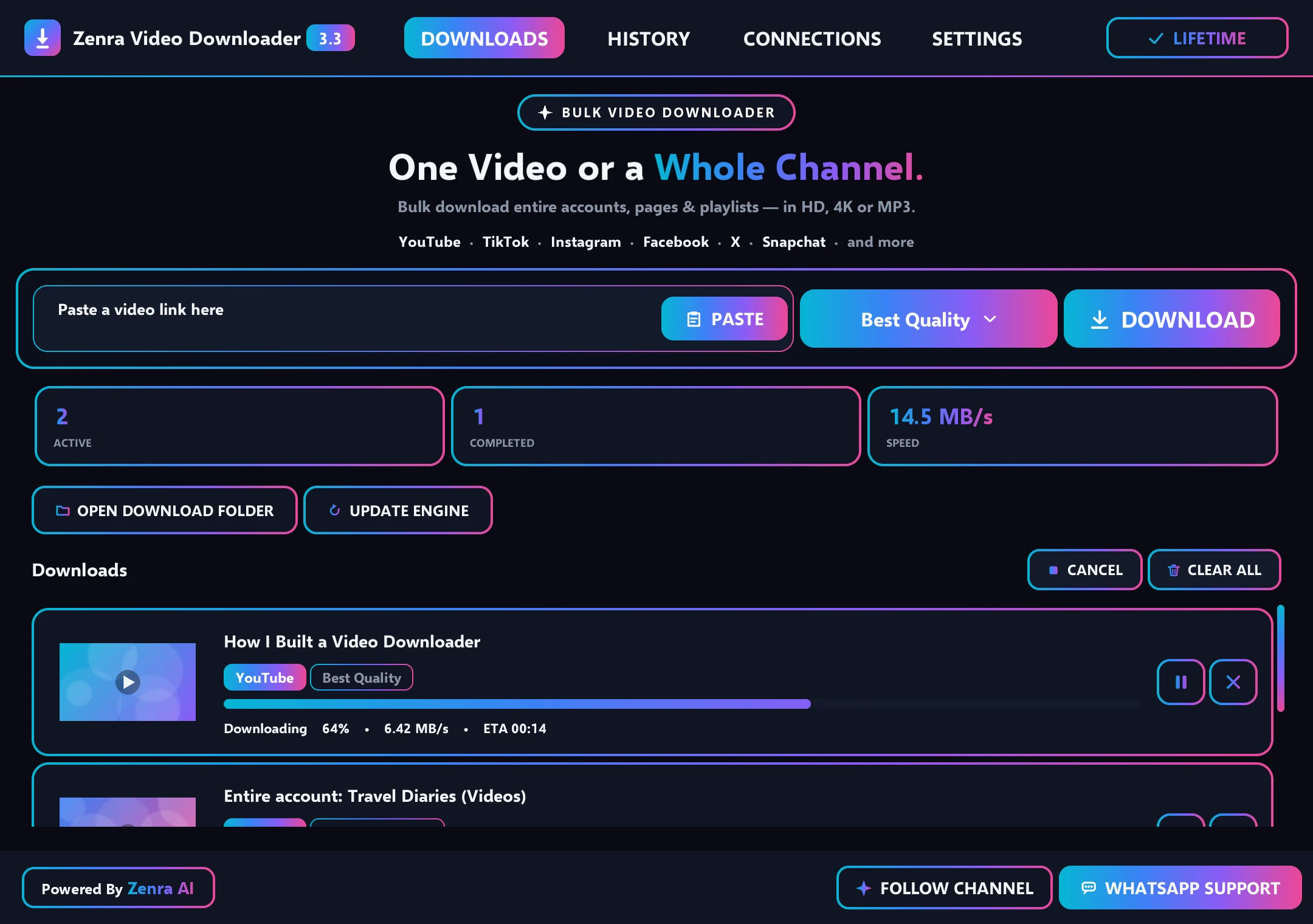
Our own app: Zenra Video Downloader
A Windows app we designed, built and run end to end — releases, licensing, payments, updates and customer support. The same standards go into every client app.
- What it does
- Saves videos, playlists and channels in up to 4K, up to five at a time.
- Under the hood
- Python, a proper Windows installer and one-click automatic updates.
- Product work
- Free trial, license keys, payments, update notices and WhatsApp support.
Cross-platform or native?
Two ways to build an app. We recommend the one that fits your users, your budget and how fast you need to launch.
| Compared | Cross-platform | Native |
|---|---|---|
| Built with | Flutter, React Native, Electron or Tauri | Swift for Apple, Kotlin for Android, C# or C++ for Windows |
| One codebase for | iPhone and Android, or Windows and Mac | One platform at a time |
| Cost and time | Lower — most of the work is shared | Higher — each platform is built separately |
| Best for | Most business apps and internal tools | Apps that need top speed or deep device features |
Deciding between a desktop app and a web app? Read Desktop app vs web app — which should you build?
How the project runs
Clear stages, a fixed quote and a working preview while we build — most projects are delivered within days.
Discovery & scope
Who will use the app, on which devices, and what it must do on day one — agreed in writing.
A feature list and a fixed quote
Design
Screens and flows designed for each platform, so the app feels at home on Windows, Mac or a phone.
Designs you can click through
Build with test builds
We build fast, in short milestones, and send test versions you can install and try as we go.
Test builds while we build
Test, package & launch
Tested on real devices, packaged as installers or store builds, signed where needed and published.
A launched app and a handover session
Updates & support
Automatic updates, crash monitoring, fixes and new features after launch.
A support plan that fits
Technologies we use
We pick tools that suit your project and your team. A typical selection:
Desktop apps
Mobile apps
Backend & services
Ways to work together
Start with a fixed-scope project, or keep us on monthly — whichever fits the work.
App prototype
A clickable prototype or a first working version to test the idea with real users.
Best for: validating an app idea quickly.
Billing: one fixed price.
Fixed-scope app build
The complete app: design, development, packaging and launch.
Best for: a defined app with clear features.
Billing: deposit to start, then by milestone.
Monthly app care
Updates, fixes, new features and new OS versions, every month.
Best for: apps with active users.
Billing: monthly, flexible terms.
Common questions
About app development. Can't find your answer? Send us your question. Guide: Desktop app vs web app
Which platforms can you build for?
Windows, macOS, iPhone (iOS) and Android. Many apps can share one codebase across platforms; when speed or a native feel matters most, we build natively. We recommend the best approach in your proposal.
How long does it take to build an app?
Fast. Most apps are delivered within a few days, and bigger apps usually take about 5–6 days — sometimes a little more or less. Mobile apps also go through App Store and Google Play review, which Apple and Google control and which usually takes from a day to a few days. We agree the exact timeline with you before we start.
How much does an app cost?
It depends on your budget and on your app — the platforms, the features and the integrations. Start by filling in the project form and sharing your idea, even if it's rough. We'll reply with a free estimate, and after a short chat you get a fixed quote before any work starts. Developer accounts and store fees are paid by you directly.
Can you publish the app on the App Store and Google Play?
Yes. We prepare the store listing, screenshots and privacy details and handle the submission. The app is published under your own developer account, so it stays yours.
Can the app update itself?
Yes. Desktop apps get one-click automatic updates — the same approach our own Windows apps use. Mobile apps update through the App Store and Google Play.
Can you add licensing, subscriptions or in-app purchases?
Yes — free trials, license keys, subscriptions and in-app purchases, connected to the payment method that suits your business and each store's rules.
Can you turn our website or Windows app into a Mac or mobile app?
Often, yes. We review what you already have and reuse as much as possible — the logic, the design or the backend — so the new app costs less and stays consistent.
Who owns the app and the code?
You do. The source code is in your repository, and the store accounts, signing certificates and backend are in your name.
Often paired with
Let's build your app.
Tell us who the app is for and which devices it should run on. We'll reply within one business day with questions and next steps.
Prefer email? Write to support@zenraai.com