

Download videos, playlists and channels in HD and 4K.
Save videos from YouTube, TikTok, Instagram, Facebook, X, Snapchat and more — one at a time, or whole playlists, channels and accounts at once — in up to 4K or as MP3.
- Version 3.3
- Windows 10 and 11
- Mac version coming soonmacOS
- 1-day free trial
- No sign-up
Works with the sites you use
- YouTube
- TikTok
- X (Twitter)
- Snapchat
- And many more
Built for bulk, built for speed
From one clip to an entire channel: fast, reliable downloads in the quality you choose.
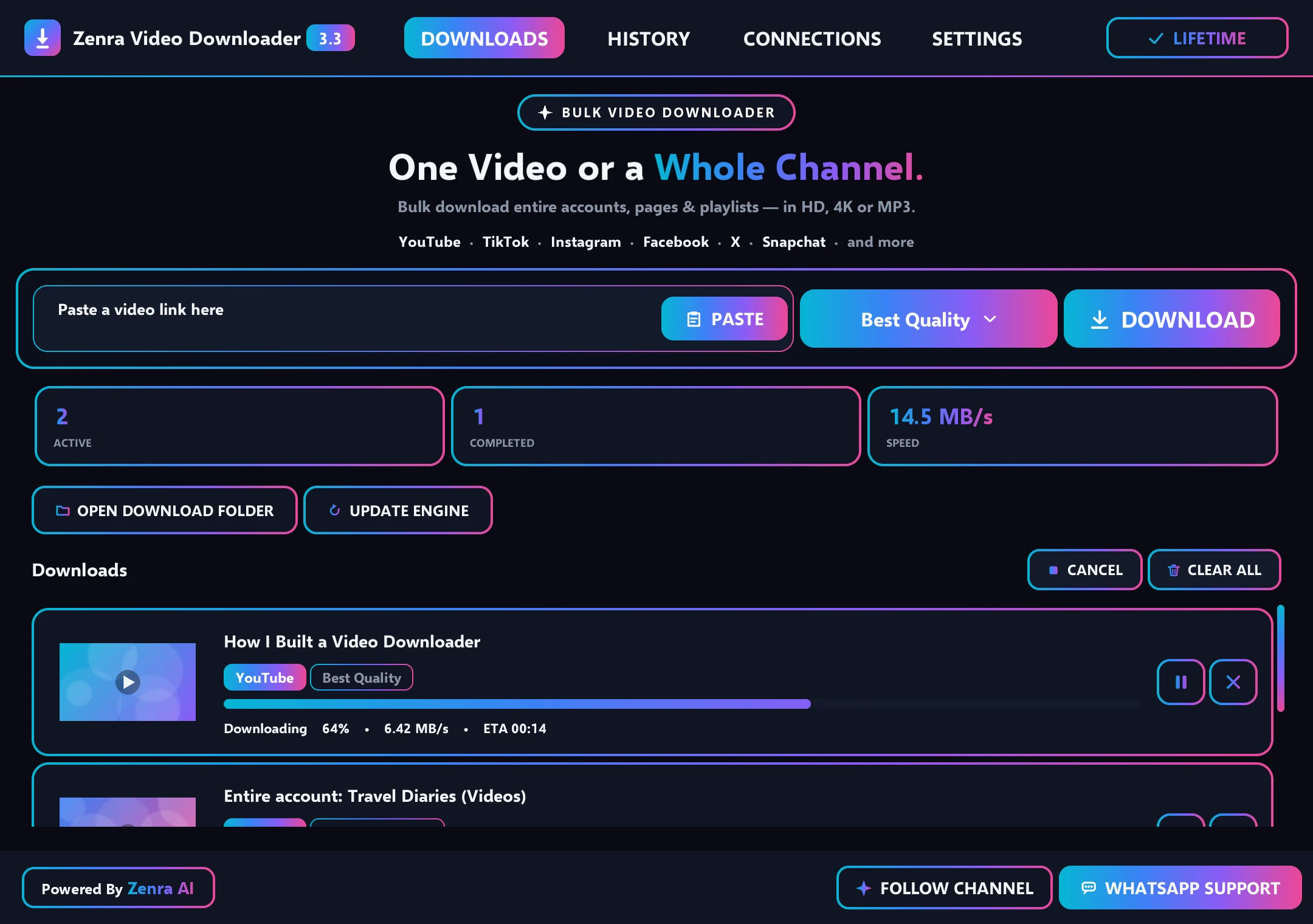
Up to five at once
Choose 1 to 5 downloads at the same time in Settings — with the live speed shown on screen.
Playlists, channels and accounts
Paste a playlist, channel or account link and save every video into its own folder in one go.
Best quality
4K, 1440p, 1080p or MP3 audio — or let Best quality pick the highest available.
Pause and resume
Pause any download and continue later, right where it stopped.
Always up to date
The download engine updates itself automatically, so downloads keep working when websites change.
Plays on every phone and TV
MP4 mode (on by default) saves standard H.264 + AAC files that play on phones, smart TVs and every media player.
Continues where it stopped
If a big playlist or channel download stops, Retry skips the videos already saved and continues with the rest.
No duplicates
Videos already in your folder are recognized and skipped — no second copies.
Clean file names
Every file is named with the original video title — no codes or extra characters.
How it works
Copy, paste, download. Paste many links at once for bulk downloads.
Copy the link
Copy the link of a video, playlist, channel or account from your browser or app.
Paste it
Paste one link or many into Zenra Video Downloader.
Choose the quality
Pick 4K, 1440p, 1080p, MP3 — or Best quality.
Download
Downloads run side by side. Click Open to go straight to the file.
Why a desktop downloader?
Online downloader websites are fine for one quick video. For playlists, channels and 4K, a desktop app does more.
| Compared | Zenra Video Downloader | Online downloader websites |
|---|---|---|
| Playlists and channels | Paste one link and every video is saved | Usually one video at a time |
| Downloads at once | Up to five, side by side | One |
| Quality | Up to 4K, or MP3 audio | Often limited to lower resolutions |
| Big downloads | Pause, resume and skip videos already saved | Start again if something fails |
| Ads and pop-ups | None | Common |
Simple pricing
Start with a 1-day free trial. Prices are in US dollars and the same in every country.
- All supported sites
- HD, 4K and MP3
- Playlists, channels and accounts
- Automatic engine updates
- WhatsApp support
- One key per PC
Paying from any country
Tap Buy on WhatsApp and tell us your country. We'll share the payment options available to you and send your license key as soon as payment is confirmed.
How to buy and activate
Everything happens on WhatsApp — quick and personal.
Install and try free
Use every feature free for one full day.
Open Upgrade
In the app, click Upgrade to see all plans.
Buy on WhatsApp
Press Buy with WhatsApp — a ready message opens in the chat.
Activate your key
After payment, paste your key under Already have a key? and press Activate.
Frequently asked questions
Need help? Ask us on WhatsApp.
Is Zenra Video Downloader free?
Every new PC gets a 1-day free trial with full access. After that, plans cost $1 for a month, $2 for 6 months, $3 for a year or $10 for lifetime access.
How much does Zenra Video Downloader cost?
Monthly $1, 6 months $2, Yearly $3 and Lifetime $10 — in US dollars, the same in every country. Every new PC also gets a 1-day free trial.
Which websites are supported?
YouTube, TikTok, Instagram, Facebook, X (Twitter), Snapchat and many other video websites.
Can I download a whole playlist, channel or account?
Yes. Paste the playlist, channel or account link and the app saves every video into its own folder — several at a time.
Which qualities can I choose?
4K, 1440p, 1080p or MP3 audio — or Best quality, which picks the highest quality the video offers.
Will the videos play on my phone and TV?
Yes. With MP4 mode on (it's on by default), videos are saved as standard MP4 files (H.264 video with AAC sound), which phones, tablets, smart TVs and every media player can play. If a site sends another format, the app converts it automatically.
What if a big download stops halfway?
Press Retry. The app skips the videos that are already saved and continues with the rest — a channel download that stopped at video 50 continues from video 51.
Will I get duplicate files?
No. Videos that are already in your folder are recognized and skipped, and two different videos with the same title are saved side by side.
How do I get new versions?
The app updates itself. When a new version is ready you see a banner — one click and it installs and reopens. The download engine also stays up to date automatically.
Does it work on my computer?
Zenra Video Downloader works on Windows 10 and Windows 11. A Mac version is coming soon.It also runs on Mac — use Download for Mac above.
Is there a Mac version?
Not yet. A Mac version is coming soon — today the app runs on Windows 10 and Windows 11.Yes. Use Download for Mac at the top of this page.
How do I buy and activate a plan?
Open the app, click UPGRADE, choose a plan and tap BUY WITH WHATSAPP. Tell us your country and we'll share the payment options available to you. After payment you receive a license key — paste it in the app and press ACTIVATE.
Which payment methods do you accept?
We share the options available in your country on WhatsApp — for example bank transfer, mobile wallets or Binance.
Can I use one key on two computers?
Each license key works on one PC. If you change your computer, message us on WhatsApp and we'll help.
Windows shows a blue warning screen. Is it safe?
Yes. New apps without a code-signing certificate can show a SmartScreen warning. Click More info, then Run anyway.
Is it legal to download videos?
Download only content you own, have permission to use, or that the platform allows you to save, and follow each platform's terms. Respect the rights of creators.
Try it free for a full day.
Every feature unlocked. No card and no sign-up.
Please download only content you own or have permission to use, and follow each platform's terms.