



Custom AI tool development
Custom AI tools that do one job brilliantly — answer questions from your documents, pull data out of invoices and forms, or add AI features to your product. Built around your data, and proven on your real examples before the full build.
- Fixed quote before we start
- Delivered in days
- You own everything
Is this for you?
Custom AI tool development is a good fit when one of these sounds familiar.
- You have documents, emails or videos to process at scale
- Your team searches the same files for the same answers
- You want an AI feature inside your own product
- Ready-made AI apps don't fit your workflow or data rules
What we build
Focused tools that solve one problem well. Need AI that takes actions across your apps? See AI agent development.
AI assistants & chatbots
Answer customers and staff from your own documents, website and policies — with sources, guardrails and a hand-off to a person.
Document & data extraction
Read invoices, contracts, forms and emails, pull out the fields you need and send them straight into your systems.
Knowledge search
One search box across your files, wiki, tickets and inbox that answers in plain language, with links to the source.
AI features in your product
Summaries, smart search, recommendations and content generation added to your web or mobile app through a clean API.
Voice & speech AI
Transcription, call and meeting summaries, action items and speech-to-text in many languages.
Video & media AI
Transcription, clipping, captions, tagging and moderation at scale. We built Zenra AI Viral Clips this way.
Computer vision tools
Detect faces, objects and text in images and video — for quality checks, cataloguing and smart cropping.
Desktop & internal apps
Windows and Mac tools and internal dashboards with user roles, licensing and automatic updates — see app development.
AI strategy & prototyping
A short discovery sprint to find where AI pays off for you — and a prototype that proves it.
How we approach AI projects
AI is only useful when it fits the work. These rules keep projects practical, measurable and affordable.
Start with the workflow
We map the task, measure how long it takes today and decide where AI genuinely helps — and where plain software is better.
Prove it on your data
A small working prototype on real examples comes before the full build, so you can judge quality early.
Choose the right model
We compare OpenAI, Anthropic, Google and open-source models on quality, speed, cost and privacy — and keep them swappable.
Keep people in control
Confidence checks, review steps and clear logs for anything that affects your customers or your money.
Keep running costs predictable
Caching, batching and smart model routing keep the cost per task low and easy to forecast.
Protect your data
Least-privilege access, encrypted secrets and providers that don't train on your data — or models on your own servers.
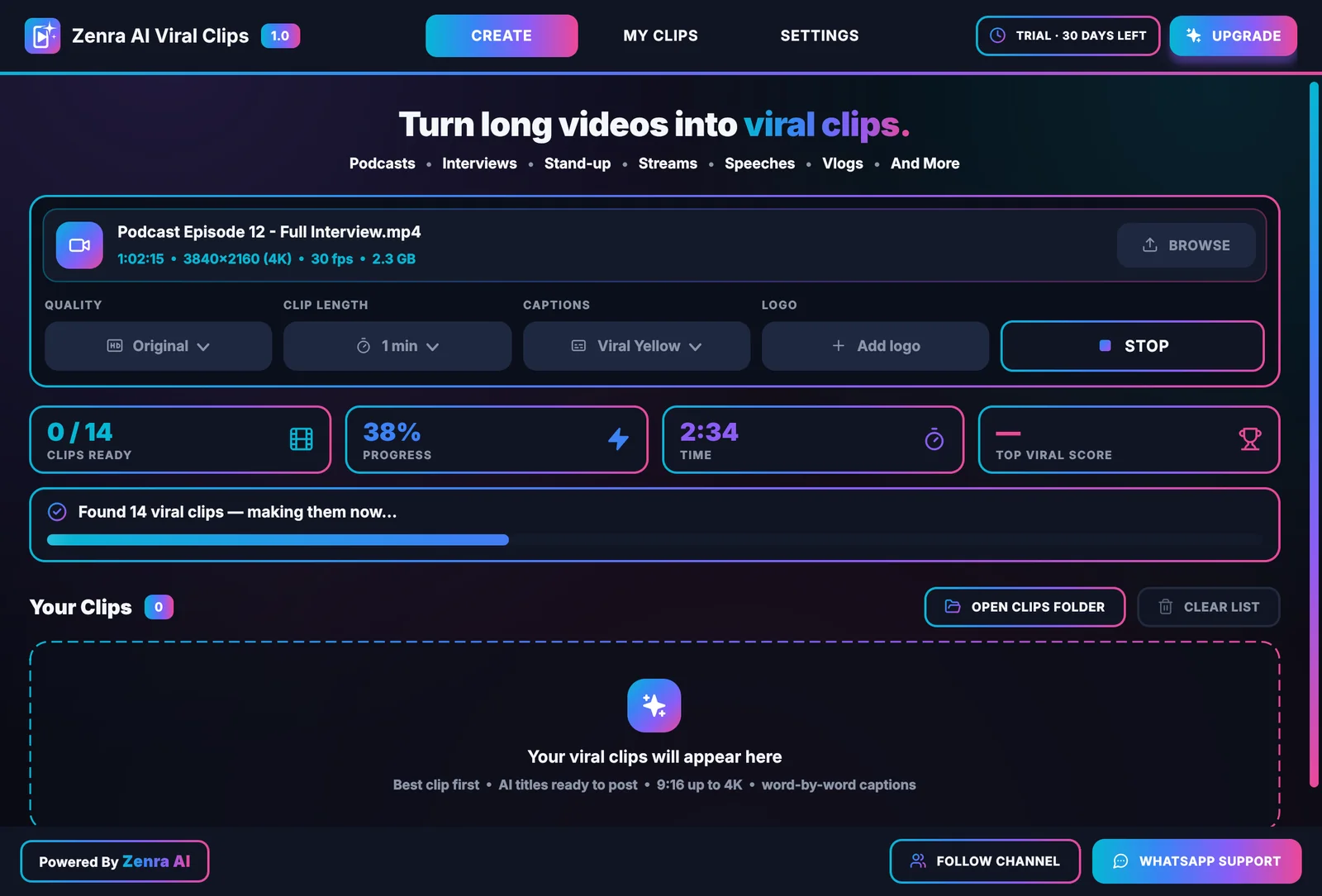
Our own AI product: Zenra AI Viral Clips
A Windows app that watches a long video like an editor: it transcribes the speech, finds the strongest moments, follows whoever is talking and renders captioned 9:16 clips on the user's own PC, up to 4K.
- What it does
- Turns one long video into ready-to-post clips with captions, titles and hashtags.
- Under the hood
- Speech-to-text, face and speaker tracking, an AI editor for moment selection, GPU-accelerated rendering.
- Product work
- Licensing, payments, automatic updates and customer support.
How the project runs
Clear stages, a fixed quote and a working preview while we build — most projects are delivered within days.
Discovery & task mapping
We look at the task end to end, collect real examples and agree what a good result looks like.
A short brief with success criteria
Prototype on your data
A focused prototype that runs on your examples, so you can test the quality before committing to the full build.
A working prototype and test results
Build & integrate
We turn the prototype into a reliable tool: interface, integrations, error handling, logs and admin settings.
Live previews and progress notes
Launch & improve
We launch, train your team, watch quality and cost, and tune the tool as real usage comes in.
Handover, documentation and support
Technologies we use
We pick tools that suit your project and your team. A typical selection:
AI models & APIs
Languages & frameworks
Data & infrastructure
Ways to work together
Start with a fixed-scope project, or keep us on monthly — whichever fits the work.
Prototype sprint
A focused build that proves the idea on your real data — usually ready in a few days.
Best for: testing an idea before committing to a full build.
Billing: one fixed price.
Fixed-scope build
The full tool: interface, integrations, admin settings and monitoring.
Best for: a defined tool with clear success criteria.
Billing: deposit to start, then by milestone.
Monthly improvement
Ongoing tuning, new features and support as usage grows.
Best for: teams rolling AI out step by step.
Billing: monthly, flexible terms.
Common questions
About custom AI tool development. Can't find your answer? Send us your question. Guide: What is AI tool development?
How much does a custom AI tool cost?
It depends on your budget and on what the tool needs to do — a focused assistant is a much smaller project than a system connected to several apps. Start by filling in the project form and sharing your idea, even if it's rough. We'll reply with a free estimate, and after a short chat you get a fixed quote before any work starts. We can also start with a small prototype, so you see the value before the full build.
How long does it take?
Fast. A prototype is usually ready within a few days, and a production-ready tool in about 5–6 days, depending on how many systems it connects to. The exact timeline is agreed with you before we start and written into your proposal.
What's the difference between an AI tool and an AI agent?
An AI tool does one job when you use it — like extracting data from an invoice or answering a question from your documents. An AI agent works through multi-step tasks and takes actions across your apps on its own. Many projects start with a tool and grow into an agent.
Is our data safe?
We use your data only for your project and keep access to the minimum. We can use AI providers that don't train on API data, or run models on your own servers or devices when privacy requires it.
Which AI model will you use?
Whichever fits the task best. We compare quality, speed, cost and privacy, and design the tool so the model can be changed later without a rebuild.
Can you add AI to our existing software?
Yes. We add AI features through an API or a small service that sits next to your system, without rewriting what already works.
Who pays for the AI usage?
You do, directly. AI accounts are set up in your name, so you control usage and billing. We show you the expected running costs before launch.
Can the tool run offline or on our own servers?
Often, yes. Open-source models can run on your own servers or even on a user's PC — our own Viral Clips app does much of its work offline.
Can you build an AI chatbot trained on our documents?
Yes. We build AI chatbots and assistants that answer from your own documents, website and policies, show where each answer came from, and hand the conversation to a person when they're unsure. It can run on your website, WhatsApp or inside your own app.
Often paired with
Let's find where AI pays off for you.
Tell us about the task you want AI to handle. We'll reply within one business day — and suggest the smallest prototype that proves the value.
Prefer email? Write to support@zenraai.com