



Turn long videos into viral clips, automatically.
Add a podcast, interview, vlog or speech. The AI finds every strong moment, keeps the right person in frame, adds word-by-word captions and titles — and gives you ready-to-post 9:16 clips, up to 4K.
- Launching soon
- Version 1.0.0
- Windows 10 and 11 (64-bit)
- Mac version coming soonmacOS
- 30-day free trial, no card
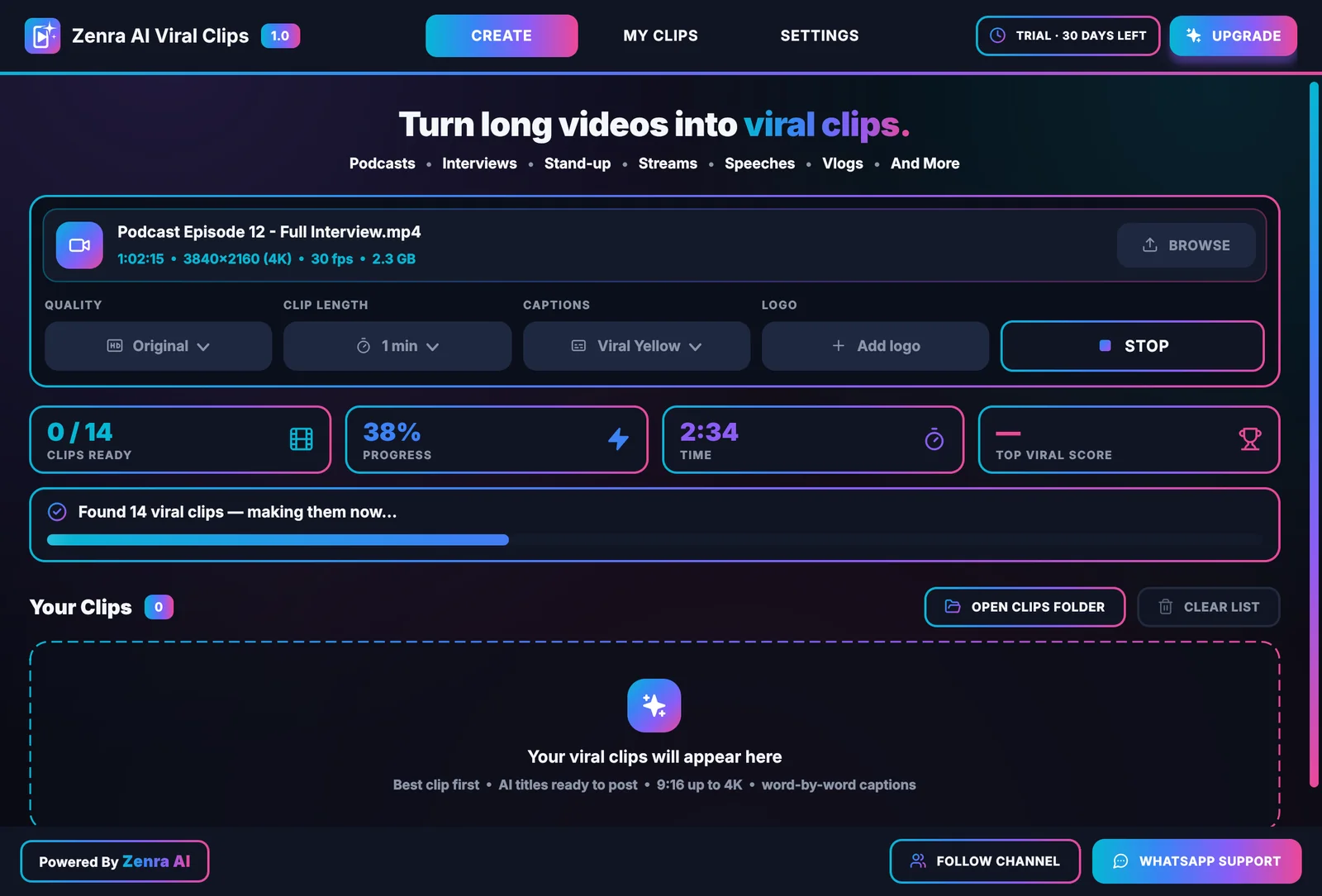
Made for every kind of long video
- Podcasts
- Interviews
- Vlogs
- Speeches
- Stand-up comedy
- Streams
- Webinars
- Classes
- Documentaries
A professional editor inside your PC
Everything an editor does to make a clip work — done for you, clip after clip.
Finds every viral moment
The AI reads your whole video like an editor — a strong hook, a complete story, a payoff — and makes a clip of each moment. Longer videos give more clips, and your best clip is always #01.
Clean starts and endings
Clips start with the question and end when the answer is finished, never on a cut-off word. Intros, sponsor reads and “thanks for watching” outros are left out.
Follows whoever is talking
Speaker detection watches lips and listens to voices, so the frame stays on the person talking — with instant cuts, like a real editor.
Split screen for conversations
When two people go back and forth, you see both: one on top, one below. Panels with three or four people stay lively instead of one long monologue.
Vlogs and on-the-go videos
The whole person stays in view and the frame widens when they move. What a vlogger holds up stays in frame, and phone clips inside a vlog fill the screen.
Word-by-word captions
Each word lights up as it's spoken. Five styles, words always in the right order, and no “um” or “uh”.
Titles and hashtags
Every clip gets a title and hashtags. Files are named Title - 01.mp4, and one click copies the title for posting.
Up to 4K quality
Original, 4K, 2K or 1080p. Intel, NVIDIA and AMD graphics speed up the final videos automatically.
Your logo on every clip
Add your logo once and it sits small and soft in the top-left corner of every clip, like a TV channel logo. No Zenra watermark.
Same clips, or new ones
Run a video again and get the same clips instantly — perfect for changing captions, logo or quality. New clips finds only moments you haven't made yet.
13 languages plus auto detect
English, Spanish, Portuguese, French, German, Italian, Turkish, Russian, Arabic, Hindi, Urdu, Punjabi and Indonesian.
Free AI built in
Runs on a free Groq key. Want more speed? Add your own Gemini, ChatGPT, Claude, OpenRouter or DeepSeek key.
Always the right framing
Your video is wide; a short is tall. Shot by shot, the app decides what belongs in the frame.
Follows the speaker
The frame stays on whoever is talking and cuts instantly when someone else speaks.
Split screen
A quick back-and-forth shows both people — one on top, one below — for that part only.
The whole person
Vlogs and walk-and-talks keep the person head to toe, and the frame opens up when they move.
The whole picture
Scenery, a drone shot or a moment with nobody in it is shown whole on a soft background — nothing important is cut.
On Auto (smart) the app picks the framing for every shot. You can also choose Follow speaker, Split screen or Full frame in Settings.
Captions that keep people watching
Every word lights up the moment it's spoken. Pick one of five styles — or turn captions off.
A caption never mixes two speakers, and the words always appear in the order they're said.
How it works
Four steps from a long video to clips you can post.
Add your video
Drag it onto the app or click BROWSE. Long videos are welcome — longer videos give more clips.
Pick your style
Choose the quality (up to 4K), clip length (15 seconds to 3 minutes), caption style and your logo.
Make viral clips
Press MAKE VIRAL CLIPS. The AI finds the moments and edits each clip — they appear one by one.
Post them
Every clip has PLAY, COPY TITLE and SHOW IN FOLDER. Start with #01 — it's your best clip.
A desktop app, not another upload
Most AI clip makers run online. Zenra AI Viral Clips runs on your own PC — here's what that changes.
| Compared | Zenra AI Viral Clips | Online clip makers |
|---|---|---|
| Where it runs | On your own Windows PC | On the service's servers |
| Your video | Stays on your PC — only the audio is sent for transcription when you use a Groq key | Uploaded to the service before it can be clipped |
| Long 4K videos | No upload wait — start right away | Must finish uploading first |
| Watermark | None — only your own logo, if you add one | Common on free plans |
| Pricing | From $4 a month, or $35 once for lifetime | Usually a monthly subscription |
| Without internet | Works for up to 7 days after a plan check, with simpler titles | Doesn't work |
Simple pricing
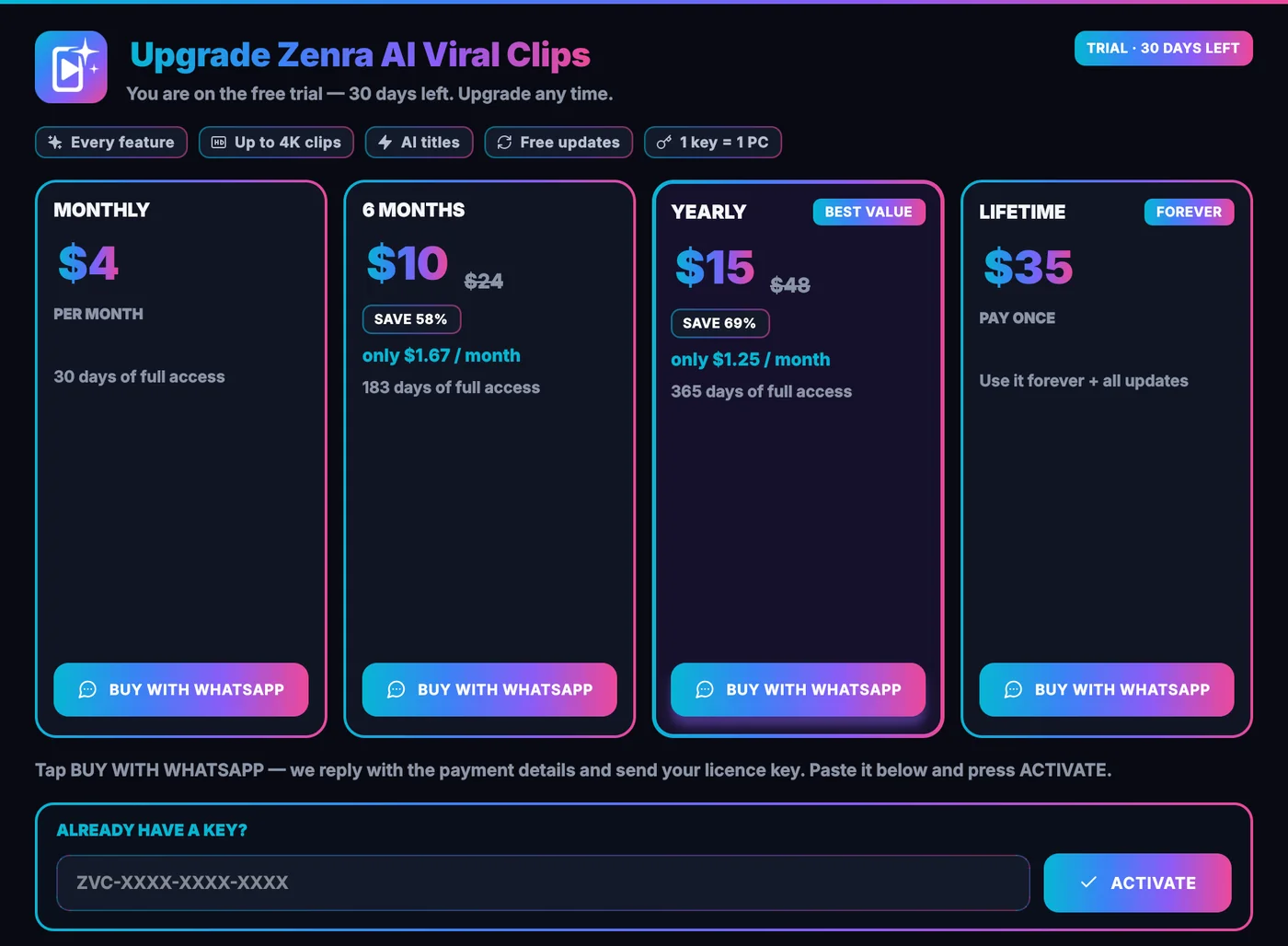
Try everything free for 30 days. Prices are in US dollars and the same in every country.
Yearly
Best valueOnly $1.25 a month
Save 69%365 days of full access
Pre-order now Buy on WhatsApp- Every feature
- Clips up to 4K
- AI titles and captions
- Free updates
- WhatsApp support
- One key per PC
Paying from any country
Tap the WhatsApp button on any plan and tell us your country. We'll share the payment options available to you — such as bank transfer, mobile wallets or Binance — and send your license key as soon as payment is confirmed.
How to buy and activate
Quick and personal: everything happens on WhatsApp.
Try it free
Install the app. Your 30-day free trial starts by itself.
Open UPGRADE
Click UPGRADE at the top right of the app to see the plans.
Buy on WhatsApp
Tap BUY WITH WHATSAPP. Your plan and Device ID are written in the message for you.
Pay and get your key
After payment you receive a license key that starts with ZVC-.
Activate
Paste it under ALREADY HAVE A KEY? and press ACTIVATE. Done.
Complete guide
Everything you need, from installing the app to using your own AI key.
Install the app
- Click Download at the top of this page.At launch, click Download at the top of this page. You get ZenraAIViralClips.exe.
- Open it and click Next until Finish. No admin password is needed. Tick Create a desktop shortcut if you like.
- If Windows shows “Windows protected your PC”, click More info, then Run anyway. New apps without a paid certificate show this once.
- Open Zenra AI Viral Clips. Your 30-day free trial starts by itself (internet is needed the first time).
Get your free Groq key (2 minutes)
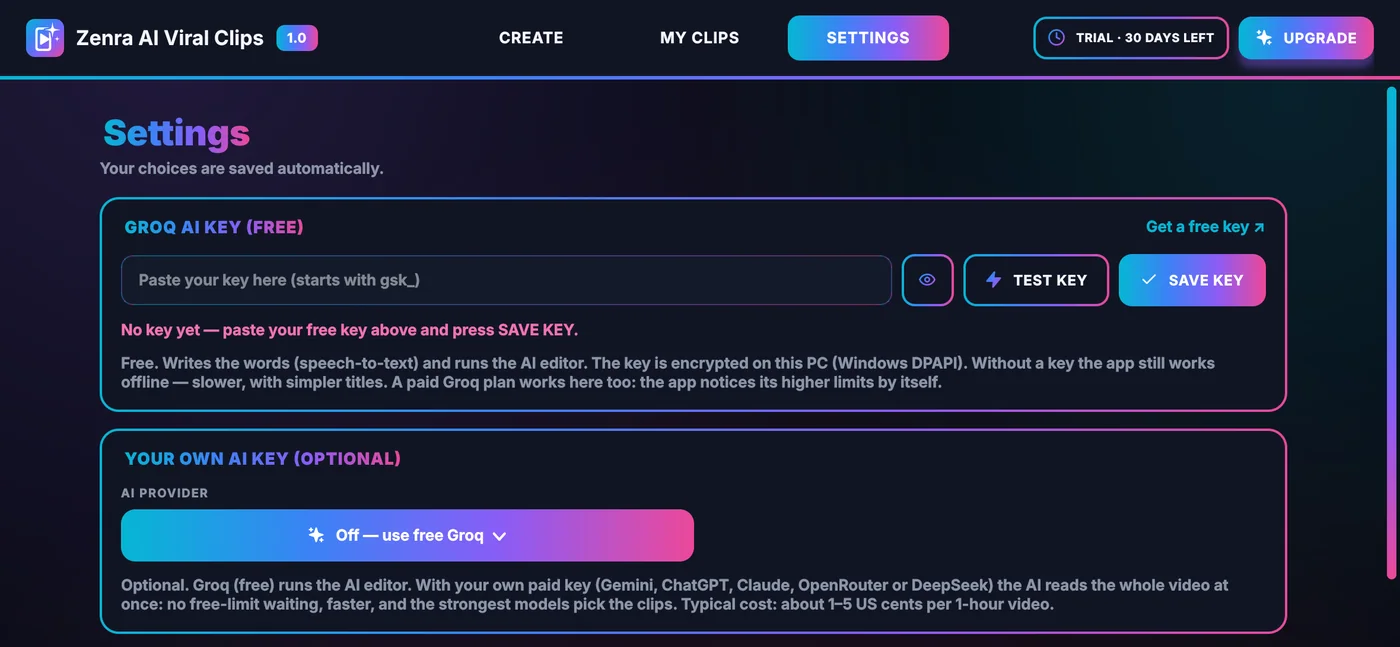
Groq is a free AI service. Its key lets the app write the words and run the AI editor — the best results, at no cost.
- Open console.groq.com/keys and sign in with Google or email.
- Click Create API Key, type any name and copy the key. It starts with gsk_.
- In the app, open SETTINGS → GROQ AI KEY, paste the key and press SAVE KEY.
- Press TEST KEY — you should see Key works.
Your key is saved encrypted on your PC. Without a key the app still works offline — just slower, and with simpler titles.
Make your first clips
- On the CREATE tab, drag your video onto the window or click BROWSE (Ctrl + O). MP4, MKV, MOV, AVI, WEBM and most other video files work.
- Quality — Original keeps your video's quality (a 4K video gives 4K clips). 4K, 2K and 1080p are there too.
- Clip length — 15 sec, 30 sec, 45 sec, 1 min, 2 min or 3 min.
- Captions — Viral Yellow, Green Pop, Zenra Cyan, Hormozi, Clean White or Off. Logo — click Add logo and choose a PNG.
- Press MAKE VIRAL CLIPS. Clips appear one by one with their title and viral score. STOP keeps every clip already made.
Find and post your clips
- Every clip card has PLAY, COPY TITLE (title and hashtags) and SHOW IN FOLDER.
- Clips are saved in Downloads\Zenra AI Viral Clips\ in a folder named after your video, as Title - 01.mp4, Title - 02.mp4 and so on — 01 is the best clip.
- The MY CLIPS tab keeps every video you've clipped, with OPEN FOLDER, COPY ALL TITLES and VIEW CLIPS.
Same clips again, or new ones
- Same video + same clip length = the same clips, instantly — no waiting for the AI. Perfect for changing the captions, logo or quality.
- After a run, press NEW CLIPS to get only moments you haven't made yet — never a repeat. When every good moment is used, the app tells you.
Settings explained
- Framing — Auto (smart), Follow speaker, Split screen or Full frame (no crop).
- Number of clips — Auto (every viral moment), or up to 5, 10, 15, 20, 30 or 50.
- Video language — Auto detect, or choose one of 13 languages.
- Offline speech model — used when there's no internet: Fast, Better or Best (slow).
- Save clips to — any folder you like.
Use your own AI key (optional)
Free Groq works well. With your own paid key the AI reads the whole video at once — no free-limit waiting, faster, and the strongest models pick the clips. Typical cost: about 1–5 US cents per one-hour video.
- Get an API key from Google Gemini, OpenAI (ChatGPT), Anthropic Claude, OpenRouter or DeepSeek.
- In the app: SETTINGS → YOUR OWN AI KEY → choose the provider.
- Paste your key and press SAVE KEY — it's tested automatically.
- Leave the AI model on Auto (recommended).
The words (speech-to-text) still come from free Groq or the offline model. If your key runs out of credit, the app switches back to Groq by itself, so your job never stops.
Updates
The app updates itself. When a new version is ready you see a popup — one click, and it installs and reopens. You can also check at any time in SETTINGS → CHECK FOR UPDATES.
Fix common problems
- “Windows protected your PC” — click More info, then Run anyway.
- “Groq key not accepted” — make a new key at console.groq.com/keys, paste it, press SAVE KEY, then TEST KEY.
- Clips are slow — choose 1080p quality, or set the offline speech model to Fast.
- Free Groq limit reached — the app moves to another model by itself. For many long videos a day, add your own AI key.
- Something went wrong — press COPY DETAILS in the message and send it to us on WhatsApp. Logs are in SETTINGS → OPEN LOGS.
System requirements
Runs on most modern Windows PCs — a Mac version is coming soon., and on Mac. More memory and a recent graphics chip make long 4K videos faster.
- Windows
- Windows 10 or 11, 64-bitInstalls without an admin password
- Internet
- For the AI and your plan checkWorks up to 7 days offline after a check
- Memory
- 8 GB RAM recommendedLong 4K videos like more
- Graphics
- AnyIntel, NVIDIA and AMD speed up the final videos
- AI key
- Free Groq keyRecommended — or your own AI key
- Disk space
- Room for your clips4K clips are large files
Frequently asked questions
Still unsure? Ask us on WhatsApp.
Is there a free trial?
Yes. Every new PC gets a 30-day free trial with every feature. No card and no sign-up.
What do I need to use it?
A Windows 10 or 11 (64-bit) PC and an internet connection. For the best results, add a free Groq key — it takes about two minutes (see the complete guide). A Mac version is coming soon.It also runs on Mac.
Which videos work best?
Podcasts, interviews, vlogs, speeches, stand-up comedy, streams, webinars, classes and documentaries. MP4, MKV, MOV, AVI, WEBM and most other video files work, up to 4K.
How many clips will I get?
On Auto you get a clip of every strong moment, so longer videos give more clips. A one-hour podcast gives about 30 clips of 15 seconds, or about 10 clips of 3 minutes. You can also limit it to 5, 10, 15, 20, 30 or 50.
Is my video uploaded anywhere?
No. Your video stays on your PC — finding faces, framing, captions and rendering all happen on your computer. With a Groq key, the audio is sent to Groq to write the words, and the text is read by the AI editor (Groq or your own AI key). Without a key, nothing from your video leaves your PC.
Do the clips have a watermark?
No. There is no Zenra watermark. Only your own logo appears, if you add one.
Which languages are supported?
Auto detect, plus English, Spanish, Portuguese, French, German, Italian, Turkish, Russian, Arabic, Hindi, Urdu, Punjabi and Indonesian.
How do I buy a plan?
In the app, click UPGRADE, choose a plan and tap BUY WITH WHATSAPP. Tell us your country and we'll share the payment options available to you. After payment you receive a license key — paste it in the app and press ACTIVATE.
Which payment methods do you accept?
We share the options available in your country on WhatsApp — for example bank transfer, mobile wallets or Binance. Prices are in US dollars and the same in every country.
Can I use one key on two PCs?
Each key works on one PC. If you change your computer, message us on WhatsApp and we'll help.
Does it work without internet?
The AI and the plan check need internet. After a check, the app keeps working for up to 7 days offline, using the offline speech model and simpler titles.
How do I get new versions?
The app updates itself. When a new version is ready you see a popup — one click and it installs and reopens.
Windows shows a blue warning screen. Is it safe?
Yes. New apps without a code-signing certificate can show a SmartScreen warning. Click More info, then Run anyway.
Turn one long video into weeks of posts.
A one-hour podcast gives about 30 clips of 15 seconds — titles, captions and framing done.
No card. No sign-up. Updates itself automatically.